Your First DeFi Risk Dashboard: Platform Walkthrough and Setup Guide
Step-by-step guide to setting up a DeFi risk monitoring dashboard for Aave V3, Spark, and Uniswap V3 positions. Learn health factor monitoring, LP range alerts, and Telegram/Discord notification setup.
If you hold positions in Aave V3 or Uniswap V3, you already know that DeFi yields attractive returns. What may keep you up at night, however, is the complexity of monitoring those positions for risk. Price swings can cause your health factor to drop unexpectedly. Concentrated liquidity positions can slip out of range and stop earning fees. Without real-time visibility, you risk missing critical signals until it’s too late.
This guide walks you through setting up a DeFi risk dashboard—a practical tool that surfaces your position risks in real time and alerts you when conditions change. By the end, you’ll know how to monitor your Aave V3 health factor and Uniswap V3 liquidity status, and you’ll have alerts configured so you never miss an important update.
Why DeFi Risk Monitoring Matters
DeFi positions face multiple concurrent risk types. Smart contract vulnerabilities, market volatility, liquidation thresholds, and concentrated liquidity hazards all threaten the capital you’ve deployed.
Without continuous monitoring, you may miss critical signals: a sudden price movement that drops your health factor, or a market shift that moves your concentrated liquidity position out of range. These events happen quickly, and periodic manual checks aren’t reliable.
A dedicated risk dashboard provides real-time visibility into your Aave and Uniswap positions across Ethereum and Arbitrum networks. Rather than juggling multiple interfaces and spreadsheets, you get a single source of truth for your position health, backed by automated alerts that fire instantly when your conditions are met.
Understanding Health Factor: Your Aave Position’s Safety Metric
The Health Factor (HF) is Aave V3’s primary risk signal. Here’s how it works:
Health Factor = (Total Collateral Value × Weighted Average Liquidation Threshold) / Total Borrow Value
This simple formula tells you how close your position is to liquidation. A higher health factor means more safety; a lower one means greater risk of loss.
Reading the Health Factor zones:
- HF >= 1.5: Your position is safe (green). Collateral exceeds your debt with buffer against price movements.
- 1.0 < HF < 1.5: Your position warrants active monitoring (amber). Liquidation risk is approaching.
- HF < 1.0: Action needed (red). Liquidators can repay your debt and seize collateral.
When your health factor drops below 1.0, the liquidation mechanics depend on position size. If both your collateral and debt sides exceed $2,000, up to 50% of your debt can be liquidated when HF > 0.95. If either side is below $2,000, or if HF ≤ 0.95, up to 100% of your debt is eligible for liquidation.
Health Factor isn’t static. It changes continuously as oracle prices move, as interest accrues on your borrowed assets, and as your collateral value fluctuates. This is why real-time monitoring is essential—a position that looked safe this morning might not be by afternoon.
Understanding Concentrated Liquidity: Uniswap V3 Position Monitoring
Uniswap V3 introduced a different kind of risk: concentrated liquidity. Unlike traditional liquidity pools where your capital is spread across all price ranges, Uniswap V3 lets you deposit within custom price ranges (defined by ticks, where each tick equals a 0.01% price change).
This design offers a significant advantage: increased capital efficiency. Your liquidity works harder and generates more trading fees when the price stays within your range. The tradeoff is that you must monitor your position actively.
When the current market price moves outside your chosen range, two things happen:
- You stop earning fees. Your position is no longer active in the pool, so trading fees aren’t collected on your capital.
- You hold only one asset. Your position converts to whichever token was at the boundary of your range, exposing you to impermanent loss if the price continues to move against you.
Unlike traditional liquidity pools, Uniswap V3 requires active position management. When your position drifts out of range, you must decide: rebalance (withdraw and re-deposit within a new range) to resume fee earning, or hold the position and accept the loss. The right choice depends on your market outlook and risk tolerance.
A monitoring dashboard makes this decision easier by showing you exactly when positions go out of range, so you can rebalance before fees stop accruing.
Getting Started: Account Setup and Wallet Connection
Setting up your risk dashboard takes just a few minutes.
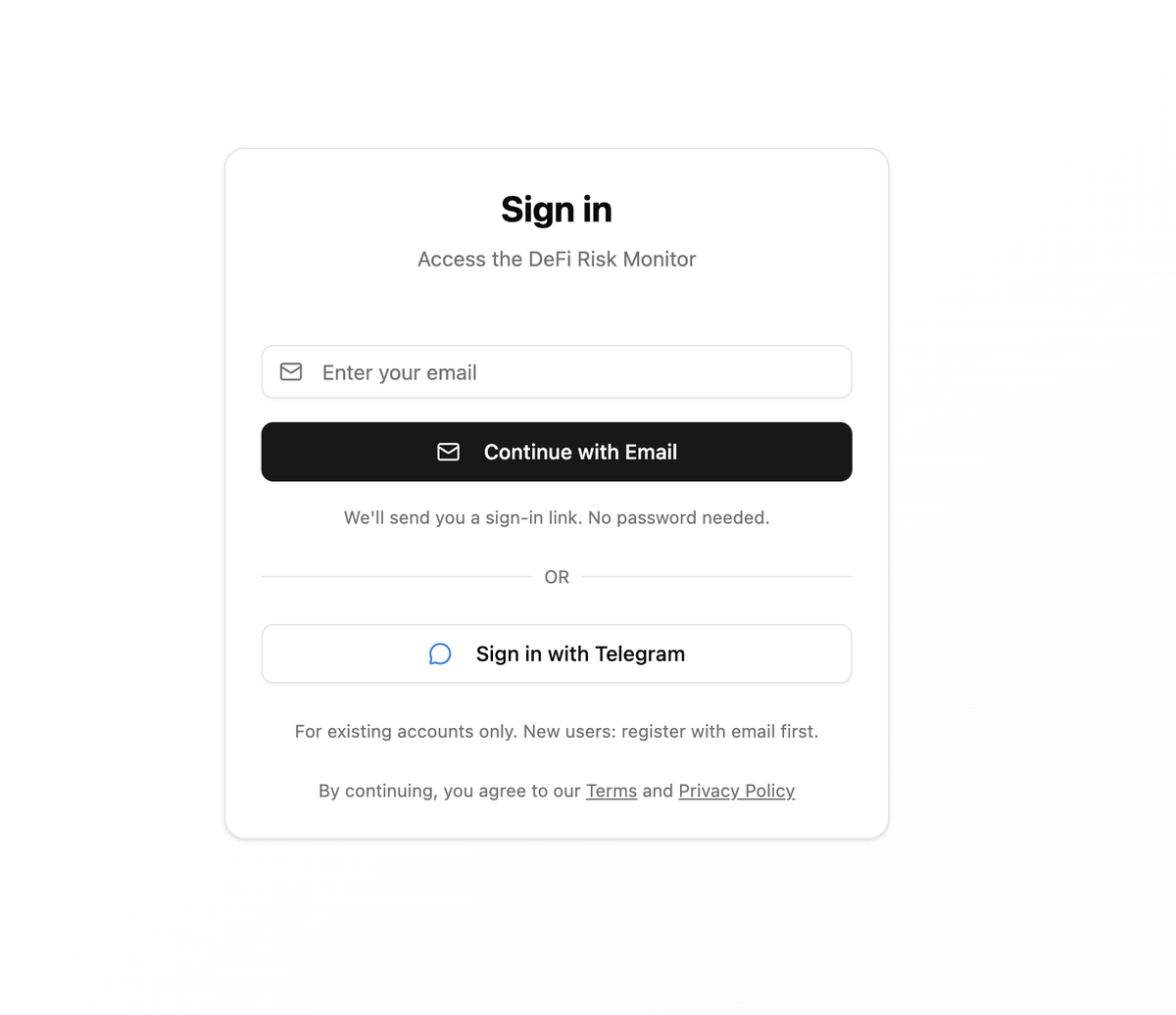
Step 1: Sign in. The platform offers two authentication methods:
- Passwordless magic link: Enter your email, click the link sent to your inbox, and you’re logged in instantly. No passwords to remember or manage.
- Telegram Mini App: If you prefer Telegram, authenticate directly via the mini app for seamless integration with notification settings later.
Step 2: Add your wallet. Once authenticated, go to Subscriptions, click Add Subscription, and enter your wallet address. This is the address where you hold your Aave deposits and Uniswap liquidity positions.
The platform currently supports Aave V3, Spark (Ethereum Mainnet), and Uniswap V3 monitoring on two networks: Ethereum mainnet and Arbitrum One. If your positions span these networks, you can monitor all of them from a single dashboard.
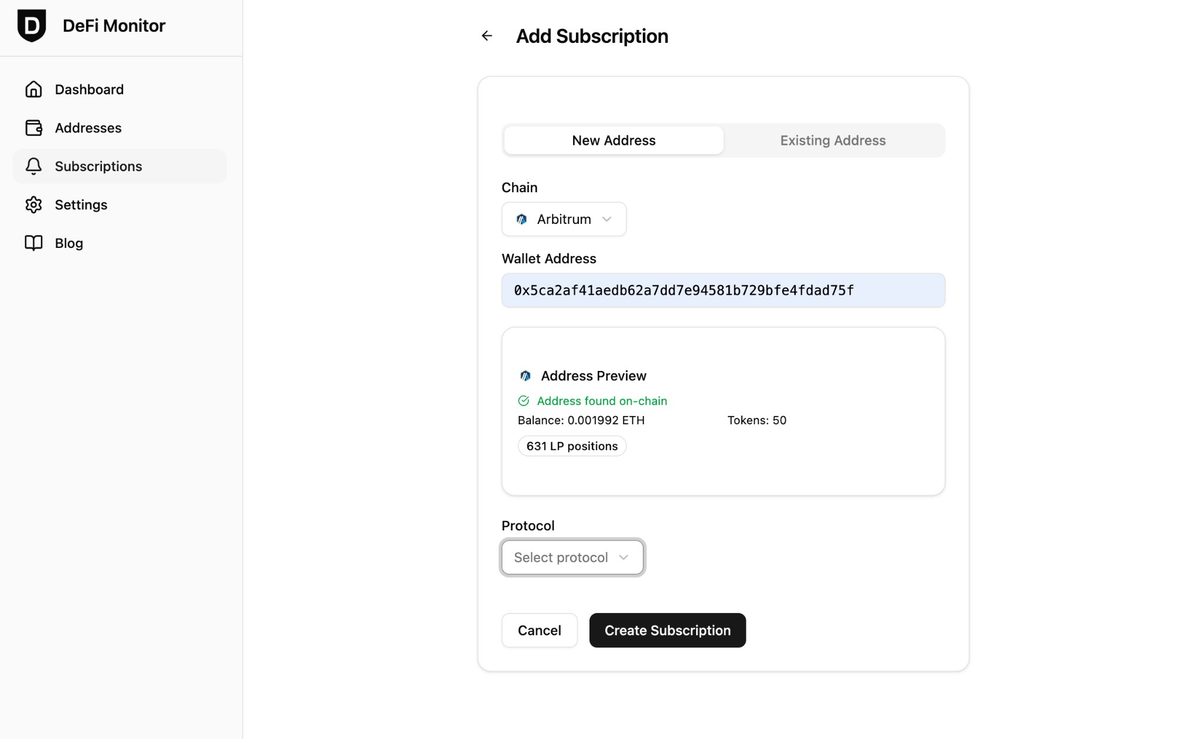
Security note: Your wallet address is used only to read on-chain position data. No private keys are required, stored, or accessed by the platform. You maintain full custody of your funds.
Monitoring Your Positions: Reading the Dashboard
The dashboard displays all your subscriptions in one view—Aave, Spark, and Uniswap cards appear together. Each card shows the key metrics for that position.
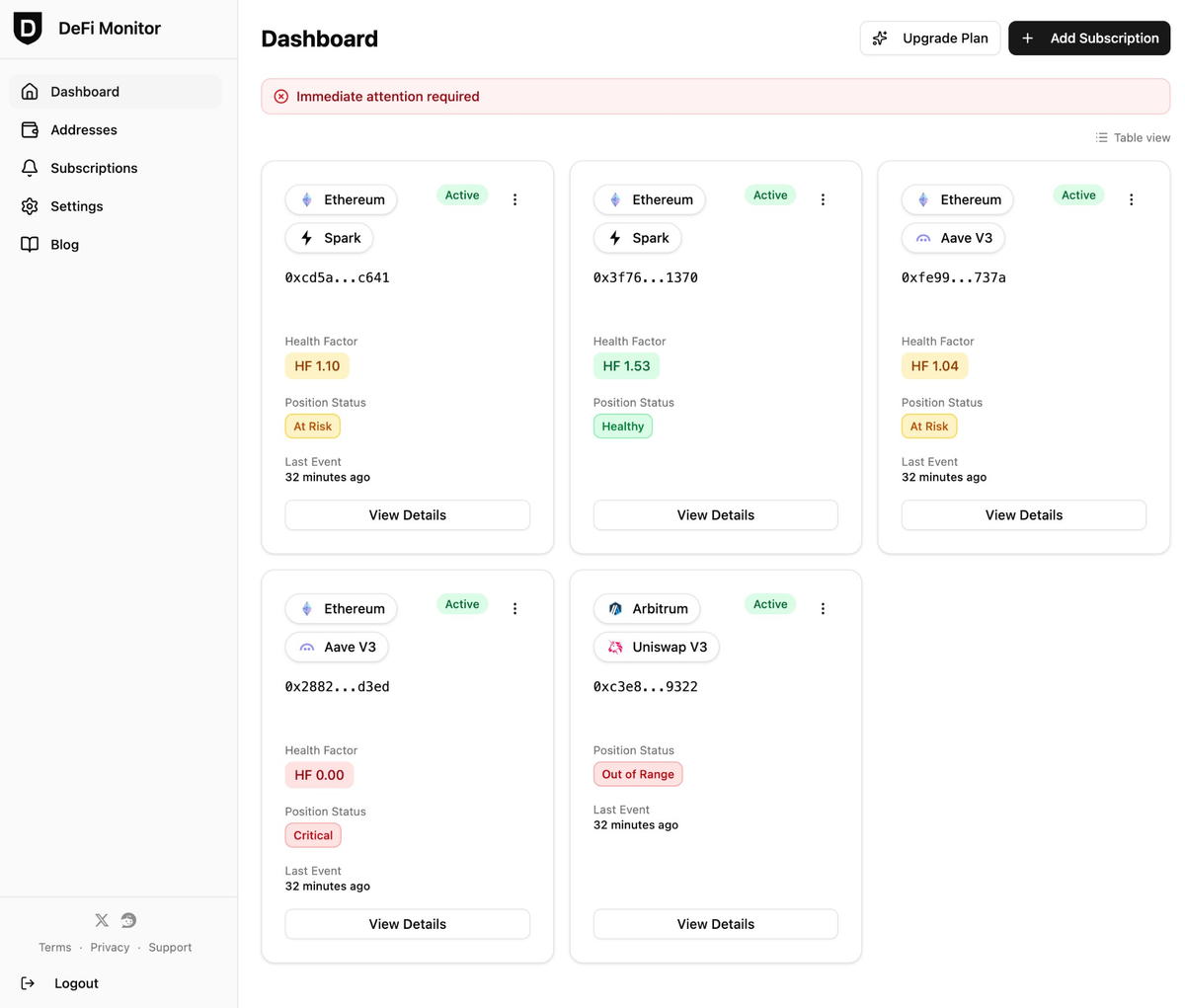
For Aave and Spark positions: Health Factor is shown prominently on each card, updated as market prices and interest rates change. The dashboard uses color-coded indicators for quick risk assessment:
- Green: HF >= 1.5 (safe)
- Amber: 1.0 < HF < 1.5 (monitor closely)
- Red: HF < 1.0 (action needed)
For Uniswap V3 positions: Each card shows Position Status (in range, near edge, or out of range) instead of Health Factor. For a deeper dive into any position, click View Details to see full metrics, active rules, and event history.
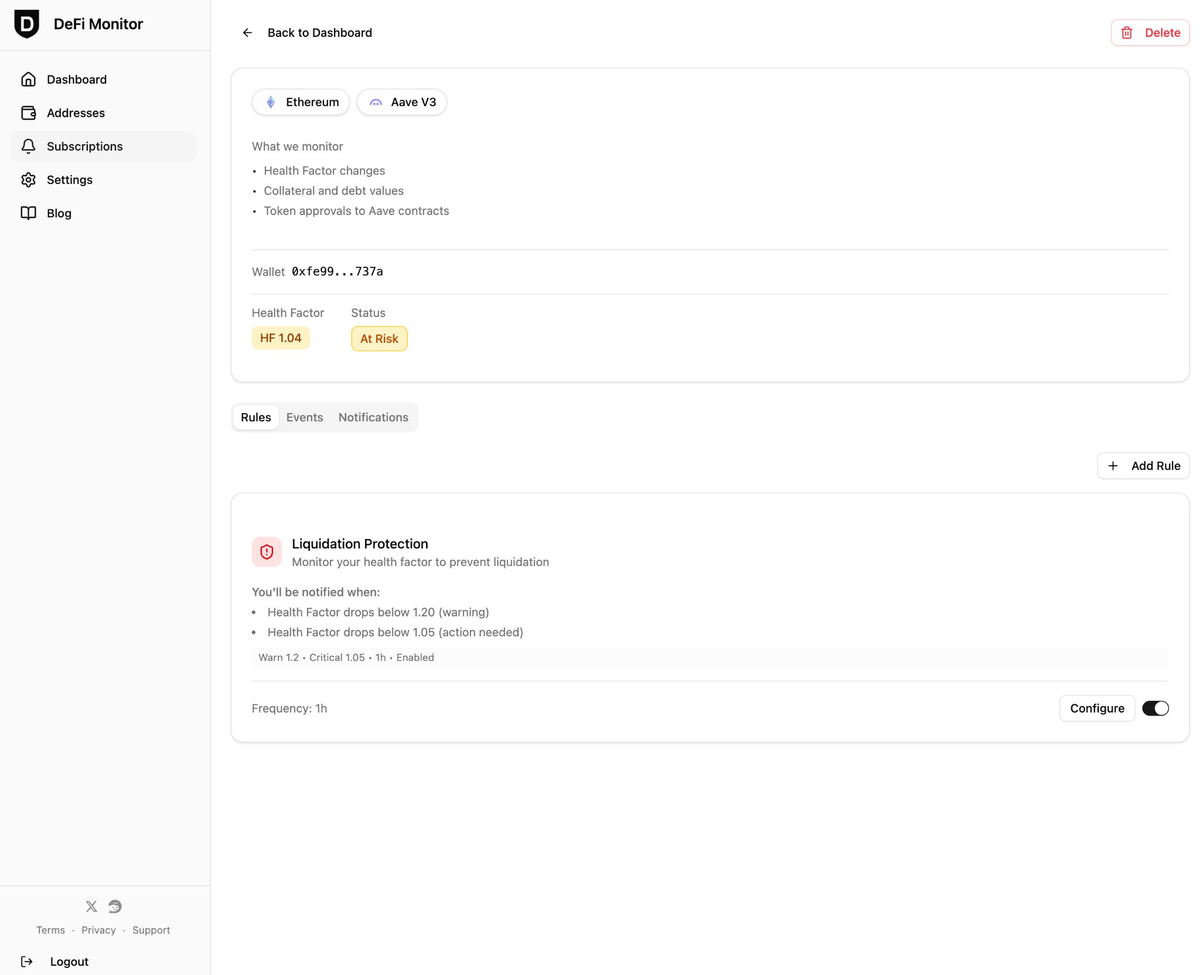
Uniswap cards on the dashboard use the same color coding for Position Status: green for in range, amber for near edge, red for out of range. On the subscription details page, you can see the current price relative to your range bounds and the pool’s fee tier (e.g., 0.05%, 0.3%). All metrics are available for positions across Ethereum and Arbitrum One.
Configuring Alerts: Telegram and Discord Notifications
Monitoring is powerful, but alerts are what make the dashboard actionable. You can configure notifications so that when risks change, you’re informed instantly—not when you happen to check the dashboard.
Step 1: Link your notification channel. Go to Settings and connect either a Telegram account or a Discord server. The platform supports both, so you can choose your preferred channel.
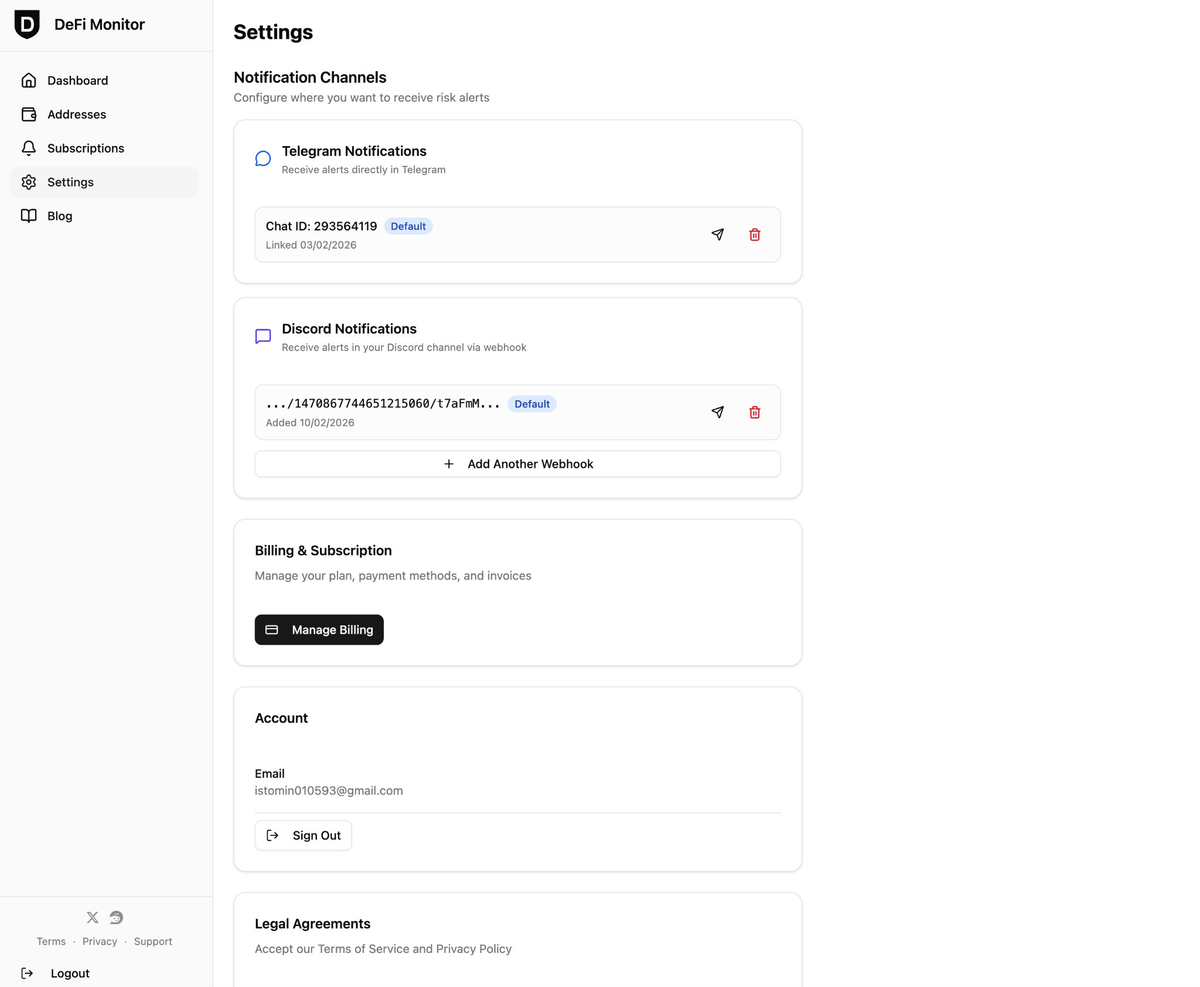
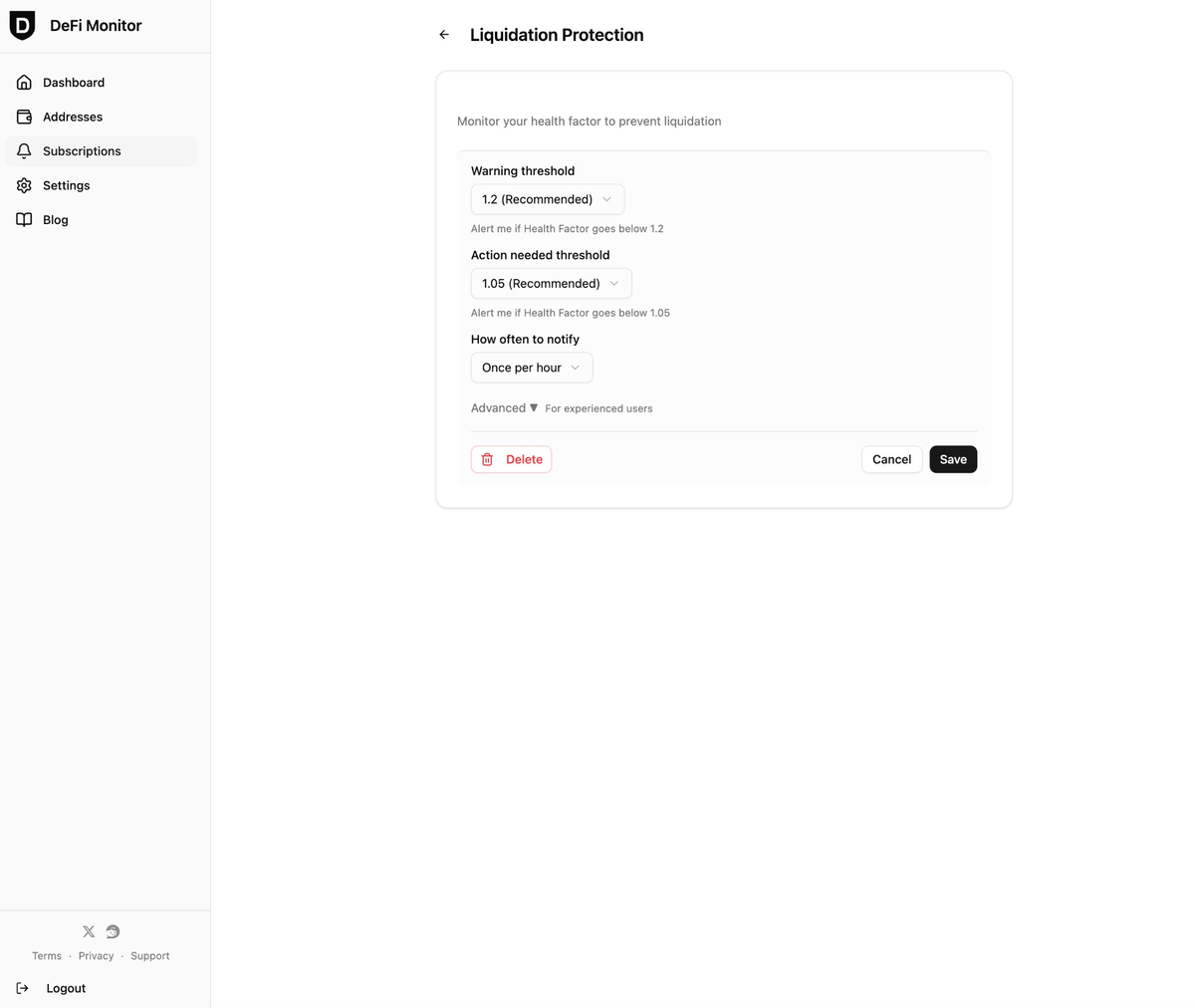
Step 2: Set alert thresholds. Define custom thresholds for the risks that matter to you:
- Aave health factor: Set a threshold—for example, alert when HF drops below 1.2 (warning) or 1.05 (action needed). You’ll receive a notification instantly when your position crosses that boundary.
- Uniswap position status: Receive alerts when a position moves out of range or when it approaches the edge of your range (near-edge alerts).
Step 3: Send a test notification. Before relying on alerts in production, send a test message to confirm your alert pipeline is active. This ensures you’re not missing real alerts because of a misconfigured channel.
Once configured, alerts fire instantly when your monitored conditions are met. This gives you the time to respond—rebalance collateral, adjust a position, or simply assess the situation—rather than discovering a problem too late.
Understanding DeFi Risk Categories and Responsible Monitoring
To round out your risk awareness, it helps to understand the broader landscape of DeFi risks. The Enterprise Ethereum Alliance published the DeFi Risk Assessment Guidelines in July 2024, adopted by UAE and EU regulators as a reference framework. These guidelines define five DeFi risk categories:
- Smart contract risks: Protocol vulnerabilities or code exploits
- Governance risks: Centralized admin keys or protocol upgrade decisions
- Market and liquidity risks: Price volatility, slippage, liquidity imbalances
- Credit and counterparty risks: Insufficient collateral, default risk
- Regulatory risks: Changes in law or regulatory status
Your dashboard monitors a subset of these: specifically market and liquidity risks (health factor, position concentration) and credit risks (liquidation proximity). It does not protect you against smart contract exploits, protocol shutdowns, governance attacks, or regulatory changes.
This tool is not investment advice. Monitoring your positions is an essential risk management practice, but the dashboard alone doesn’t guarantee protection against all DeFi risks. Use this platform as one component of your broader risk strategy, combined with personal research, conservative position sizing, and diversification.
Conclusion
Setting up a DeFi risk dashboard transforms how you manage your positions. Instead of juggling multiple interfaces, spreadsheets, and manual checks, you get real-time visibility into your health factor, liquidity position status, and risk alerts—all in one place.
The setup process is straightforward: sign in via magic link or Telegram, add your wallet address, and configure alerts for the metrics that matter to you. Whether you’re concerned about liquidation risk on Aave or out-of-range liquidity on Uniswap, the dashboard gives you the tools and visibility to respond quickly.
Ready to get started? Sign up today, add your Aave and Uniswap positions, and configure your first alert. Taking control of your position monitoring is the first step toward more confident DeFi participation.